The buying decision
A meaningful upgrade. An optional one.
Switch 2 makes the most sense when its games are the reason you want it. The larger, sharper screen and flexible play modes strengthen the hybrid idea, but an LCD panel, extra storage costs, and a limited battery budget deserve as much attention as the 4K headline.
The specifications that actually matter
Nintendo’s published specifications provide a useful starting point. These are hardware capabilities, not promises that every game will run at the maximum resolution or frame rate. [1]
| Component | Nintendo Switch 2 |
|---|---|
| Handheld display | 7.9-inch LCD, 1920 × 1080, HDR10, VRR up to 120 Hz |
| Processor | Custom NVIDIA processor |
| Internal storage | 256 GB UFS; some space reserved for the system |
| Expandable game storage | microSD Express, up to 2 TB |
| TV output | Up to 4K at 60 fps; up to 120 fps at 1080p or 1440p |
| Battery | 5,220 mAh; Nintendo estimates 2–6.5 hours |
| Weight with controllers | Approximately 1.18 lb / 535 g |
| Connectivity | Wi-Fi 6, dock Ethernet, two USB-C ports, 3.5 mm audio |
A better screen has more than one definition
The move to a larger 1080p display should make small interface elements and distant objects easier to resolve. That is particularly relevant to games designed around television-sized interfaces. More screen area is also useful in tabletop play, where two people may be sitting farther from the console. These are implications of the specifications, not measurements from our own testing.
For an owner of the original Switch, resolution and size are compelling reasons to investigate an upgrade. For a Switch OLED owner, the decision is less straightforward. LCD and OLED have different strengths; a higher resolution does not automatically deliver the same deep black presentation you may already enjoy. If you often play dark games in a dim room, compare both screens in person before treating this as a universal display upgrade.
A 120 Hz panel can show higher frame rates when a game supports them. It cannot make a game with a fixed 30 fps cap run at 120 fps. Likewise, HDR support describes compatibility, not a measured brightness or contrast result. We have not measured the panel’s response time, brightness, HDR performance, or motion clarity, so this review does not assign scores to those qualities.
Treat 4K as an output capability
The practical question for television play is what your chosen game does with the available hardware. A console can output a 4K signal while a game renders at a lower internal resolution. Resolution reconstruction, visual settings, and frame-rate targets all affect the result. Nintendo also states that performance improvements for earlier Switch games vary by software. [2]
Before buying for a specific title, look for its current performance modes and patch notes. Separate a developer’s target from independently measured performance. A screenshot can help you judge detail, but it cannot show consistent frame delivery or input response. If a game is why you are upgrading, use that game as the evidence rather than an attractive console specification.
For a family sharing one television, the bigger upgrade may simply be having a game that can move between the living room and handheld play. For someone who plays exclusively docked, compare the full system and game cost against other consoles. Portability only adds value if you use it.
Controllers, comfort, and the little conveniences
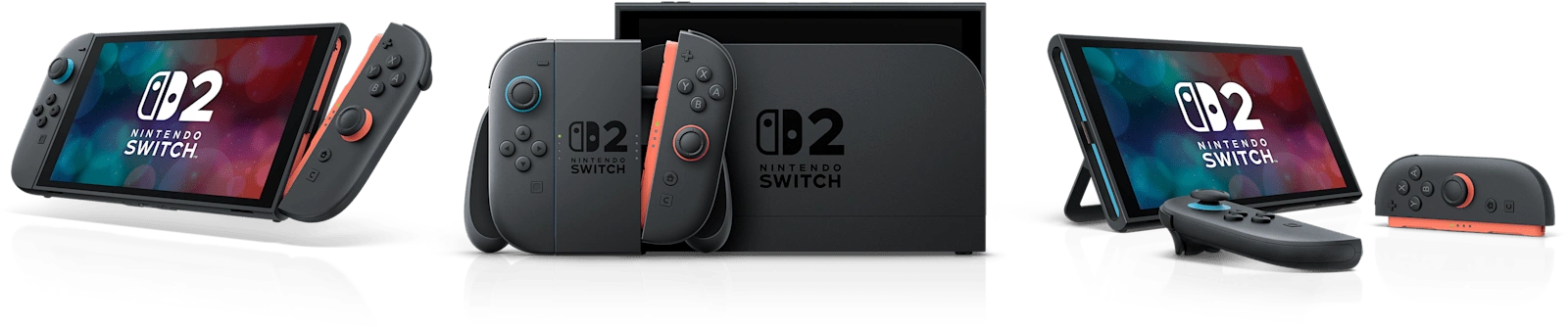
Joy-Con 2 attaches magnetically, and compatible software can use the controllers as mice. The adjustable stand and top USB-C charging port also make tabletop sessions easier to plan. Nintendo describes these features on its hardware page. [2]
Mouse controls are worth checking game by game. They do not turn every console title into a mouse-and-keyboard PC experience. Think about the surface you will use, how you will sit, and whether your preferred game actually supports that input. A sofa and a stable desk can produce very different ergonomic experiences.
For handheld comfort, try the console for longer than a quick pickup. Support your elbows, hold it in the position you use at home, and check whether your fingers naturally reach the shoulder buttons. We cannot make a tested claim about grip comfort, controller drift, long-session fatigue, or wireless latency without using the hardware ourselves.
The storage upgrade has a catch
The important word on an expansion card is Express. An ordinary microSD card from an earlier Switch is not interchangeable with the game-storage format Switch 2 requires. Capacity alone is not enough to confirm compatibility. Check the product’s exact standard before ordering. [1]
Start with the games you expect to keep installed. Add their listed download sizes, leave room for updates, and decide whether deleting and redownloading older games bothers you. A large card is convenient, but there is no need to buy the maximum capacity on day one if your library fits internally.
Inspect physical game packaging too. A purchase should be evaluated by its download and storage requirements, not only by whether it arrives in a plastic case. Confirm the publisher’s requirements for each title, especially if you travel without a dependable connection or share games within a household.
Plan around a battery range, not a single number
Nintendo’s 2–6.5-hour estimate is explicitly dependent on the games you play. A demanding game during a long journey is a different workload from a short session with a simpler title. Our advice is to plan conservatively for travel and check your charger and power bank compatibility before departure.
Battery life is one area where proper testing matters: the game, brightness, wireless settings, system version, and test duration should all be recorded. This article contains no invented rundown result. If endurance is your deciding factor, look for a repeatable test of your actual workload before committing.
Reasons to consider it
- A larger, sharper handheld display.
- One system for handheld, tabletop, and TV play.
- More internal storage and useful charging flexibility.
- Compatible physical and digital Switch games carry forward, with exceptions.
Tradeoffs to weigh
- LCD may be a different visual preference from Switch OLED.
- Expansion requires microSD Express.
- Demanding games can limit time away from a charger.
- Higher refresh and resolution capabilities depend on the software.
Who should buy, and who should wait?
Consider buying if there are Switch 2 games you want now, you regularly move between handheld and TV play, and the full cost fits your budget. Check Nintendo’s compatibility list for important older titles; support is not universal. GameChat’s online requirements also include Nintendo Switch Online, so include membership costs if that feature matters. [2]
Consider waiting if your current Switch already runs the games you care about, you mainly want an OLED-like display, or you are stretching your budget for a resolution headline. Make a short list of three games you would play immediately. If that list is hard to fill, waiting is a reasonable decision.
Our verdict is therefore conditional rather than a numerical score: Switch 2 is a convincing continuation of the hybrid concept on paper, with concrete improvements and concrete compromises. Genuine hands-on impressions and measured performance should be added only after documented testing.
Compare before you buy
Check the bundle, seller, and storage requirements.
Amazon links are affiliate links. As an Amazon Associate I earn from qualifying purchases. Prices and availability are shown by the retailer.
Sources and editorial notes
Sources checked October 3, 2026. Our analysis draws on Nintendo’s specifications and the documentation linked above. Product imagery: Nintendo.